




SOLIDWORKS Visualize - Instructor-Led Online Training
Quantity:
Choose Options
Quantity:
All classes are taught in English unless otherwise noted.
Course Description
The SOLIDWORKS Visualize course teaches you to leverage your 3D CAD data to create photo-quality content in the fastest and easiest way you can, from images to animations, interactive web content, and immersive virtual reality.
Course Length: 4 half days
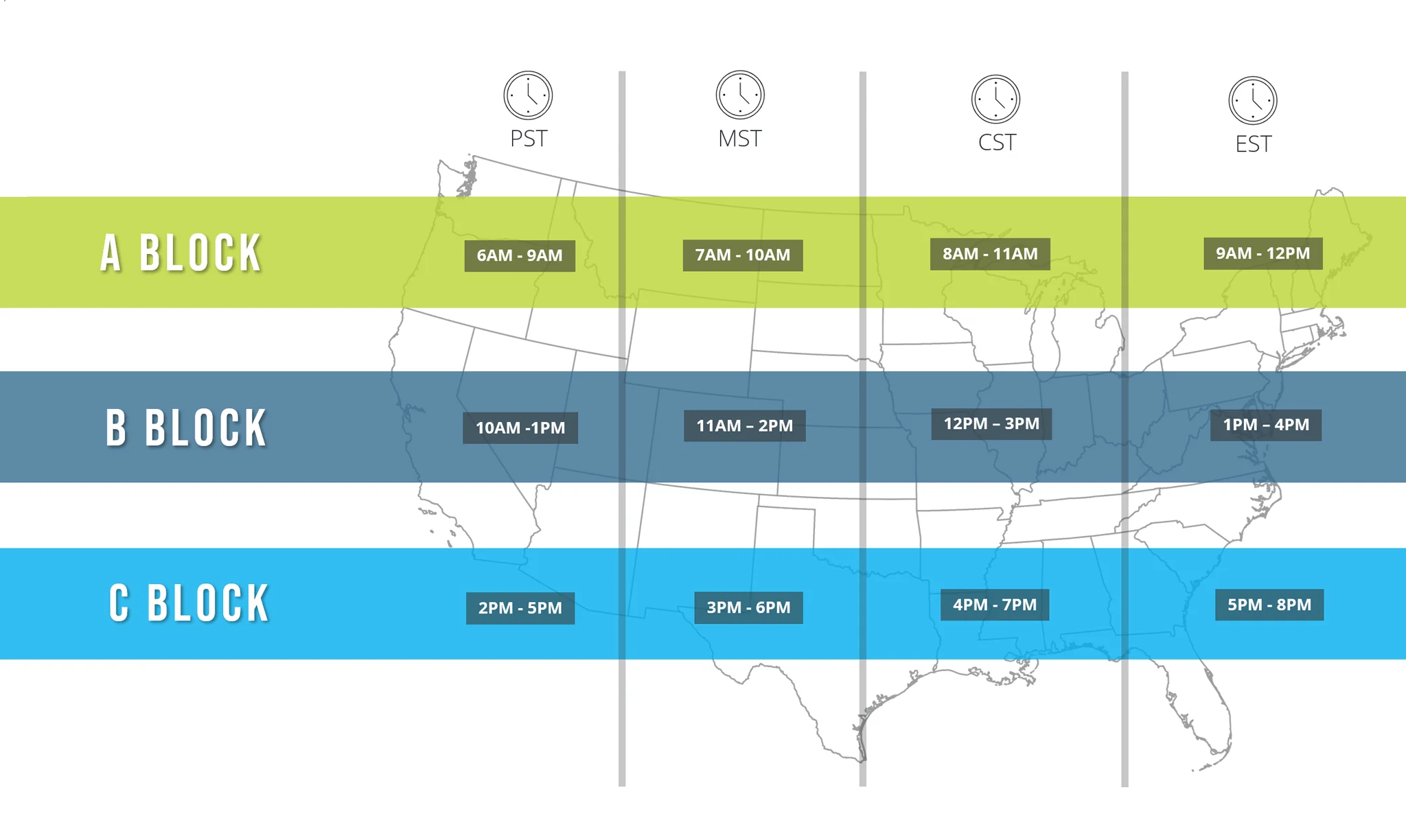
B BLOCK - 12pm-3pm CT
Have questions? Click Here for Training FAQ
Prerequisites
- Completion of SOLIDWORKS Essentials or similar experience
- Access to SOLIDWORKS Visualize
- Experience with Windows operating system
Lesson Plan
Lesson 1:
CAD to SOLIDWORKS Visualize
- Rendering from CAD
- Importing to Visualize
- Visualize User Interface
- Render Selection
- Denoiser
- Appearances
- File Libraries
- Scenes
- Rendering
Lesson 2:
Import Settings and Appearances
- Import Settings
- Appearances
- Part Grouping
- Structure and Organization
- Selection Tools
- Object Manipulation
- Split
- Copy and Paste
- Appearance Types
- Textures
- Texture Mapping
- Appearance Type Parameters
- Merge Parts
Lesson 3:
Decals
- Decals
- Decal Feature
- Decal Depth
- Decal Mapping
- Multi-Layer Decal Process
Lesson 4:
Cameras
- Cameras
- Aspect Ratio
- Keep Above Floor
- Grid Overlay
- Perspective
- Camera Orientation
- Depth of Field
- Filters
Lesson 5:
Backplates, Environments and Lights
- Scenes
- Import Model
- Backplates
- Environments
- Lights
Lesson 6:
Productivity Tools
- Patterns
- Productivity Tools
- Multiple Views
- Render All Cameras
- Time Limit Rendering
- Configurations
- Export
- Render All Configurations
- Render Queue
- Visualize Boost
Lesson 7:
Animations and Groupings
- Animations
- Groups
- Animation Output
- Motion Blur
- Keyframe Animation
Lesson 8:
Camera Animations
- Camera Animations
- Camera Movement with the Triad
- Keyframe Properties
Lesson 9:
Animating Appearances, Scenes
- Appearance and Scene Animations
- Scene Animation
- Appearance Animations
Lesson 10:
Alternative Outputs
- Alternative Outputs
- Turntable
- Interactive Images
- Panorama View
- Sun Study
- 360 Camera
Lesson 11:
Simulations
- Simulated Physics
- Shake Simulations
- Vehicle Simulations
- Physics Animations
